

Handheld Terminal Software
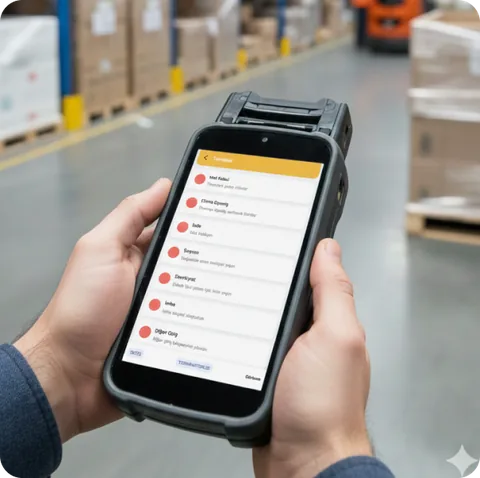
Handheld terminal operations, which are often added to ERPs later and offered as different patches, have been constructed from the beginning in DerinSİS and developed to be used in mobile and needed areas. The handheld terminal software described here is for standard operations, and there is a separate terminal software developed for WMS-Warehouse Management System.
Infrastructure
The handheld terminal is independent of the brand and model, does not require installation, and is easily manageable due to its online structure. The user interface shaped by the sector's correct needs displays all the necessary information in the right way, even on the small interfaces of handheld terminals. Users can easily adapt and use it immediately.
It provides instant listing of warehouses and other store stocks without requiring transfer. It offers exceptional possibilities with its interactive work with all modules of DerinSİS. The use of movement reasons in the same way also develops the reporting infrastructure.
Automatic Order Connection
While users often struggle with order selection, an 'automatic connection' feature has been developed that can be activated when needed. In this case, the user only performs the physical receipt, and order connections are made by the system. Even if there are multiple orders and multiple shipping documents, they can be connected accurately from old to new.
In addition to this option, there are also choices to select open orders before or after physical receipt and complete the shipping document.
Physical Receipt Comparison and Approval Process
There is a 'shipping control' option developed for disagreements that may often occur in shipments from warehouses or other stores. With this method, a rule can be activated that requires all product quantities to be re-entered at the receiving point and approved if they match one-to-one. This feature is also valid for returns from stores to the warehouse.
In DerinSİS, the receiving mechanism is always dominant. Instead of many unapproved documents and numerous 'shipping difference' documents that are hard to track, a system based on the receiving party's convincing and the dispatching party's correction is offered. After the receiving party approves, no changes can be made by anyone unless the receiving party removes the approval.
Functions
- Label-Price Control
Product labels and shelf labels can be read to control prices. Instant lists can be created for products that require transaction, and these lists can be used in other modules with one key.
- Physical Receipt
In physical receipt transactions where order information can be viewed, system rules can be activated to prevent physical receipt without an order. These controls can be relaxed for some product groups due to categorical features.
According to a different scenario, excess products are received, but return shipping documents are automatically cut by the system. Flexibility is provided based on the decision-maker's information in this method.
In scenarios where orders are selected from the beginning, users can control orders and read quantities against each other during physical receipt, and perform required controls with options such as different/equal/excess/less/all.
- Request Entry
The order process can be started with handheld terminals at the store on the shelves. In this scenario, stock, sales performance, package information, insert status, and other information that employees may need are provided practically and at the store. The company's hand remains strong in product expert work done on the shelves with supplier elements.
- Purchase Order Entry
Based on the product procurement situation, procurement location, and decision-maker information, orders can be given to suppliers, warehouses, or other stores. Required stock, performance, purchase information are shown to employees on the same screens and according to company rules.
- Return from Purchase
The return process from purchase, designed with sub-depot scenarios within the framework of return rules, allows contracts to affect handheld terminals. Outputs can be made from main warehouses or return sub-depots.
- Shipment
Shipments to other stores and warehouses are made according to company internal order users. The physical receipt control continued at the other party is carried out as mentioned above.
- Sales Order Entry
The sales order, which starts with customer and shipping address selection, allows the creation of a sales order list at the warehouse or store shelves according to company processes. As the order is written into the system, a shipping document is ready for shipping responsible persons, and the sales shipping process begins.
- Sales
Sales orders from various sources can be called from the handheld terminal, initiating the collection process. Orders entered by warehouse employees via terminals or instant orders from internet systems are monitored by a special module as shipping documents, alerting users.
- Return from Sales
The return from sales transaction also works according to company rules, ensuring that products are correctly reflected in stocks.
- Other Stock Movements
All authorized stock movements can be carried out from the hand terminal in detail. Accordingly, the user menu also changes. For example, movement types such as internal company usage, destruction, sample product entry, other entry, and other exit can be implemented.
Inventory Transactions
Inventory transactions, which are complementary to Inventory Management on the terminal, are rich in content, including more than the use of counting firms. It allows for operations such as counting by unit codes, blind counting, and cross-counting. Thanks to its online structure, counting entries can be monitored instantly. Areas can be divided with different terminals, and all can be processed as a single count.
Local Correction
Depending on the implementation of control processes, stores can be allowed to correct their stock on shelves instantly. This is necessary for order data to be formed with correct values and for user and system decisions to be made correctly. However, it is also essential to implement it under control. The special reports and functions designed for audit departments in DerinSİS ensure that this process is operated fully.
Planogram Support
In case the placement of products on in-store shelves is managed, product addresses that can be planned on a store-aisle-area-corridor-shelf basis can be used on the hand terminal to assign products. With this system, where special developments can be made on a project basis, product searches in-store can be learned from the system.