

Inventory Management

The counting process contains many features outside the system operation since it relies on human labor and attention. You can review our experiences in the 'Frequently Asked Questions' section for managerial issues and points to be considered.
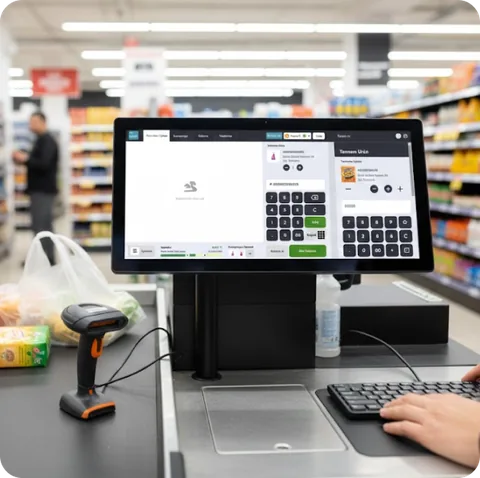
The counting process is carried out in two environments: hand terminal and computer. Derinus works online by being connected to the database via remote access, without requiring any transfer. It is carried out in 4 steps: counting preparation, counting process, control, and approval.
Counting Scenarios That Can Be Applied in DerinSİS
In full location counting, products not counted are reset with approval. Stock quantities of others are equalized to counting quantities.
In counting a group of products, the counted group is defined in the product selector, and those not counted but in this group are reset. Therefore, the product group specified from the product selector should match the actually counted products. For example, it is necessary to count the entire range of a brand or category.
In negative stock counting, with approval, it is assumed that stock is negative and not counted are zero. Therefore, it is essential to ensure that all negative stocks are thoroughly investigated.
In system list counting, the system creates counting lists for a specific purpose. These products are counted. For example, the system lists 25 different products daily, such as expensive products, best-selling products, etc. Stores perform counting, and the center examines the results.
Basic Steps of the Counting Process
1. Preparation: Preparations should be made physically and systemically. Attention should be given to staff training, especially outside peak counts.
2. Counting Process: It should be completed from the last closing time to the start of the next sales and in one go.
3. Control and Comparison of Counting: The count itself should be controlled, and counting errors should be corrected. Uncounted products should be reported, and reports of counted products should be made by arranging in order of quantity, price, and amount, making it easy to detect apparent errors. Then, counting and stock comparisons are made.
4. Approval of Counting: No document entry is made retroactively from the counting date, and if necessary, corrections are made in counting documents without changing the counting result. For this, historical settings can be provided in System Management.
1. Recommendations for Full Location Counts
Before physically starting the count, preparations should be made on shelves and in warehouses. Product storage conditions should be made suitable for counting. Products scattered in different places should be gathered in one area if possible. Unexpected places like back of shelves, behind doors, and corners should be checked. Attention should be given to completing documents prior to the counting date and transferring sales.
In terms of counting technique, it may be preferable to have three different people pass through each shelf in the counting area divided into sections. The first one can handle the collection and preparation for counting, the second one can write down the count on a piece of paper and stick it on the products, and the third one can control the quantity and enter it into the hand terminal.
To obtain more reliable counting results, it can be planned for each area to be counted again by a different person. In this case, stock comparisons are made with the first count, and then when the second count is done, both stock and two count results are considered together, and a triple control is applied.
2. Using DerinUs Hand Terminal
Files can be opened on the hand terminal, and counting can be done with multiple terminals and users. For conflicts, the total quantity counted and the quantity counted in the file can be seen at any time. On the counting management interface, information entered on terminals can be monitored and reported instantly. The terminal processes are directly connected to the system via remote access, so unidentified products are detected instantly. If corrections are needed in counting quantities, the same product can be read, and a 0 quantity record can be made.
The counting file can be viewed and modified on the computer. Deletion can only be done on the computer and must be done by writing to a file.
It is essential to plan well for files to be opened for users and areas. The boundaries of these areas should be finalized for users.
3. Counting-Stock Comparison Step
Comparisons are made from many aspects before approval. However, as the time passed can bring other difficulties, controls should be completed as soon as possible. A report can be obtained for the selected counting file or all files of that area. Various operations are performed according to the reasons for differences mentioned above. While checking counting errors, sorting from selling price, quantity, and amount can quickly detect some errors. Unrecorded sales data can be transferred, and days with problems such as not having a Z report can be transferred again. Wrong documents and unrecorded documents are entered retroactively.
Barcode assignment and product definition errors are usually noticed as two separate product images in extra and minus stock. Product transfers (movement unification) are made for these products.
In retroactive entries made before counting approval, if products have not entered the count, attention should be given to adding these quantities to the counting file.
4. Counting Approval
The most critical information regarding counting approval is the date on which the count will be based. On the comparison and control reports taken before approval, the creation date of counting files is used. For the situation where products counted on different dates are written into the system as if counted on a specific date, an additional date is given in the approval step. During approval, various information that will assist users as operations continue is shown on the screen as a log.
Equalizing Approval
Only entry and exit movements are created for the differences to give the stock quantities the counting result of the counted products. It is usually used in lists with a small number of items and where the difference is slight.
Depending on the option to reset uncounted items, stock quantities of products not counted in the count are reset. Here, it is crucial to specify a group of products with the 'Product Selector'. The counted products' group properties should match one-to-one, and all products belonging to this group should be counted. The uncounted product report is the best helper at this point.
The most common mistake made in this counting approval method is expecting to see counting quantities in the counting documents created by the system. However, only differences between stock and counting quantities exist here. Based on this difference, we find the relevant product in the document type of entry or exit by looking at the two files created.
Approval by Resetting
Stock of counted products will be reduced to zero, and exit (entry for shortages) movements are created. Then, counting results are written as a single entry document. It is usually used in full location counts and where the difference is significant. The most questioned issue in this approval method is the creation of three counting documents. In the first two documents, products with stock differences are reset separately. The third document contains counting results.
Order Systems and Local Correction
Ideally, it is expected that daily negative stocks are counted in stores and automatically corrected without needing data processing. More importantly, negative stocks remain outside the automatic ordering process. Therefore, products with negative stock are reported to relevant parties weekly or daily automatically. Data processing should closely monitor products in this situation. DerinSİS has a 'Local Correction' function for this process, and it can be applied very practically with a hand terminal.
SKT-Based Counting
In projects where the SKT process is effective, counting results made with square barcodes work to correct stock on an SKT basis. In this unique structure, not only adjustments are made for product stock quantities, but also correct entry and exit movements are produced to capture SKT dates on labels.